# Containerize Next.js Application

&#x20;By the end of the guide, Stakpak's AI agent will:

* Create the Dockerfile
* Build and run the Next.js app in a Docker container

1. Go to <https://stakpak.dev/> , sign in and create a new flow.
2. Click on agent (top-right corner).

<figure><img src="https://2684022488-files.gitbook.io/~/files/v0/b/gitbook-x-prod.appspot.com/o/spaces%2FOFDKnFMEMmJjoclGx9Hr%2Fuploads%2FkNw48Yx6AzyH3hBID6sU%2Fimage.png?alt=media&#x26;token=90255bdd-16cb-47e7-a3a8-cc2cebfa910e" alt=""><figcaption><p>Agent in UI</p></figcaption></figure>

3. Start by ensuring the Stakpak CLI is installed. If it's not, install it first before proceeding with the agent's steps. [Broken link](https://stakpak.gitbook.io/docs/archive/broken-reference "mention")

<figure><img src="https://2684022488-files.gitbook.io/~/files/v0/b/gitbook-x-prod.appspot.com/o/spaces%2FOFDKnFMEMmJjoclGx9Hr%2Fuploads%2Fqr0yBCcHFjcOJN9Nuedf%2Fimage.png?alt=media&#x26;token=c4aeb278-5986-499c-b4e4-08199bc5c57a" alt=""><figcaption><p>Install Stakpak CLI</p></figcaption></figure>

4. Choose **dave** agent. This is the agent that creates Dockerfiles to containerize your app.

<figure><img src="https://2684022488-files.gitbook.io/~/files/v0/b/gitbook-x-prod.appspot.com/o/spaces%2FOFDKnFMEMmJjoclGx9Hr%2Fuploads%2ForU2MozgPTxZIyMxTmAi%2Fimage.png?alt=media&#x26;token=7fac4825-21a3-4295-ba52-9fdbe189a53b" alt=""><figcaption><p>Choose your AI Agent</p></figcaption></figure>

5. Copy & run the command on your terminal to start the agent session.

<figure><img src="https://2684022488-files.gitbook.io/~/files/v0/b/gitbook-x-prod.appspot.com/o/spaces%2FOFDKnFMEMmJjoclGx9Hr%2Fuploads%2Fl1rVuwwoLaPIe3ZaCcfZ%2Fimage.png?alt=media&#x26;token=6637d857-237c-495f-815a-5d7f4c6ef202" alt=""><figcaption><p>Command to run on terminal</p></figcaption></figure>

6. Answer the questions the AI agent asks based on your app. Provide as much information and dependencies as possible.

<figure><img src="https://2684022488-files.gitbook.io/~/files/v0/b/gitbook-x-prod.appspot.com/o/spaces%2FOFDKnFMEMmJjoclGx9Hr%2Fuploads%2FQ2BEFZVSrq39hgE2yBnI%2Fimage.png?alt=media&#x26;token=f53269b9-cc03-486e-8d96-6d8179ad3374" alt=""><figcaption><p>Questions from the AI agent</p></figcaption></figure>

7. The agent creates the Dockerfile.

<figure><img src="https://2684022488-files.gitbook.io/~/files/v0/b/gitbook-x-prod.appspot.com/o/spaces%2FOFDKnFMEMmJjoclGx9Hr%2Fuploads%2FZ6aUrP549fdcOmdC6IIJ%2Fimage.png?alt=media&#x26;token=723ce1bb-98d6-4461-a45c-a3a33dbc9c02" alt=""><figcaption><p>Creating the Dockerfile</p></figcaption></figure>

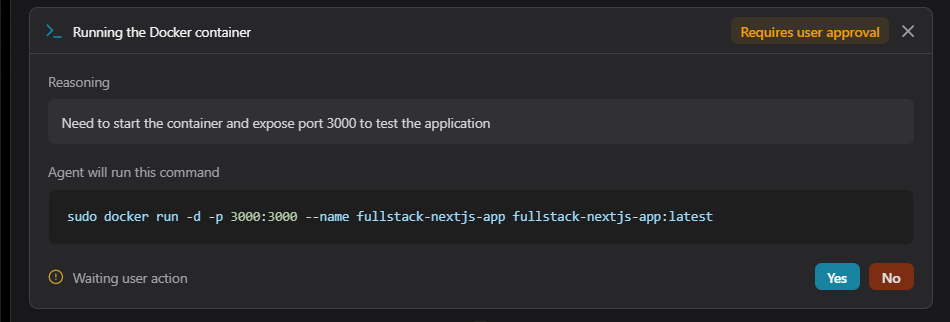
7. Accept the command to run the Docker container. Each step has it's reasoning.

<figure><img src="https://2684022488-files.gitbook.io/~/files/v0/b/gitbook-x-prod.appspot.com/o/spaces%2FOFDKnFMEMmJjoclGx9Hr%2Fuploads%2FdCJMEABu89zBsHtEVW2p%2Fimage.png?alt=media&#x26;token=88519c0e-cbc2-4e3a-89f6-bb815c226f2c" alt=""><figcaption><p>Commands run by the AI agent</p></figcaption></figure>

8. Once the agent finishes all steps, the status will be changed to **Complete**.&#x20;

<figure><img src="https://2684022488-files.gitbook.io/~/files/v0/b/gitbook-x-prod.appspot.com/o/spaces%2FOFDKnFMEMmJjoclGx9Hr%2Fuploads%2FgNFOShIuBLW1z7Abt0bT%2Fimage.png?alt=media&#x26;token=cb0f5a5a-a7ee-4845-9cbc-63315a5ccfed" alt=""><figcaption><p>Agent completed containerization</p></figcaption></figure>

9. Congrats! Your app is ready to use! :tada:

<figure><img src="https://2684022488-files.gitbook.io/~/files/v0/b/gitbook-x-prod.appspot.com/o/spaces%2FOFDKnFMEMmJjoclGx9Hr%2Fuploads%2FEP3Yga8sPhiugZ65XO8W%2Fimage.png?alt=media&#x26;token=f2a9b75f-4099-43e2-8336-325e8cb1d3d7" alt=""><figcaption><p>Successful containerization</p></figcaption></figure>

You now have the Dockerfile in your directory and your docker container up and running! :dancer:All autonomous :robot:

**P.S.** (Pretty Sweet bonus info): try containerizing any app —Flask, FastAPI, Next.js, Node.js, you name it)— with your AI DevOps agent! :wink::rocket: