> For the complete documentation index, see [llms.txt](https://stakpak.gitbook.io/docs/llms.txt). Markdown versions of documentation pages are available by appending `.md` to page URLs; this page is available as [Markdown](https://stakpak.gitbook.io/docs/tutorial/detect-and-fix-missing-backups-for-a-postgresql-db-in-production.md).
# Detect and Fix Missing Backups for a PostgreSQL DB in Production
## Overview
Running a PostgreSQL database in production without backups is one of the most common and dangerous mistakes.
Everything works fine… until it doesn’t.
In this guide, we will set up Stakpak [Autopilot](/docs/how-it-works/autopilot.md) to continuously monitor our database, ensure backups are configured, and nag us on Slack if they’re missing.
## Problem
A PostgreSQL database can run in production without any backups configured, and nothing will tell you.
Setting up backup monitoring manually requires:
* Writing and scheduling backup jobs
* Verifying backups actually run
* Tracking retention and storage
* Setting up alerts when backups fail or stop
In practice, this is often skipped or misconfigured.
Backups silently stop working, schedules drift, or alerts are never set up.
By the time you notice, It's usually too late.
## How Stakpak Helps
Stakpak uses [/Init](/docs/how-it-works/init.md) to analyze your infrastructure and identifies stateful services like PostgreSQL.
Then it:
* Detects whether a backup strategy exists
* Flags missing or unsafe configurations
* Recommends a safe backup schedule
* Offers to set up Stakpak [Autopilot](/docs/how-it-works/autopilot.md) to monitor your infrastructure 24/7, detect unexpected changes, fix what’s safe, and only alert you when it actually matters.
## Step-by-Step Guide
### Prerequisites
1. [Install Stakpak](/docs/get-started/install-stakpak.md)
2. Cloud provider credentials configured
Now we can start.
1. Open stakpak and type `/init`
2. Now it will start exploring the local repos and the different cloud providers you have configured
3. Let's take a look at the apps.md that it created
First, we see that it found one app running on a t3.small EC2 instance, which has both Flask + PostgreSQL
Then it flagged all the risky stuff that it found, one of which was that there are no backups at all
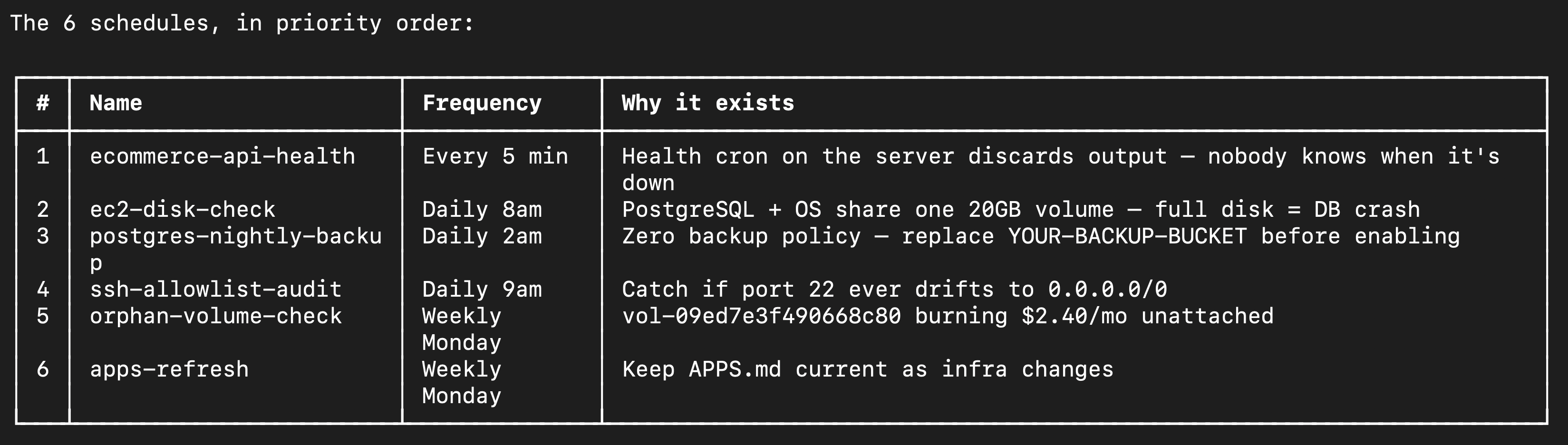
Then it recommended to set up autopilot schedules, as you can see, one of them is to make sure that the database is backed up
4. Now let's ask Stakpak to mitigate the critical risk and to sit up Stakpak [Autopilot](/docs/how-it-works/autopilot.md)
Then it will do stakpak magic✨
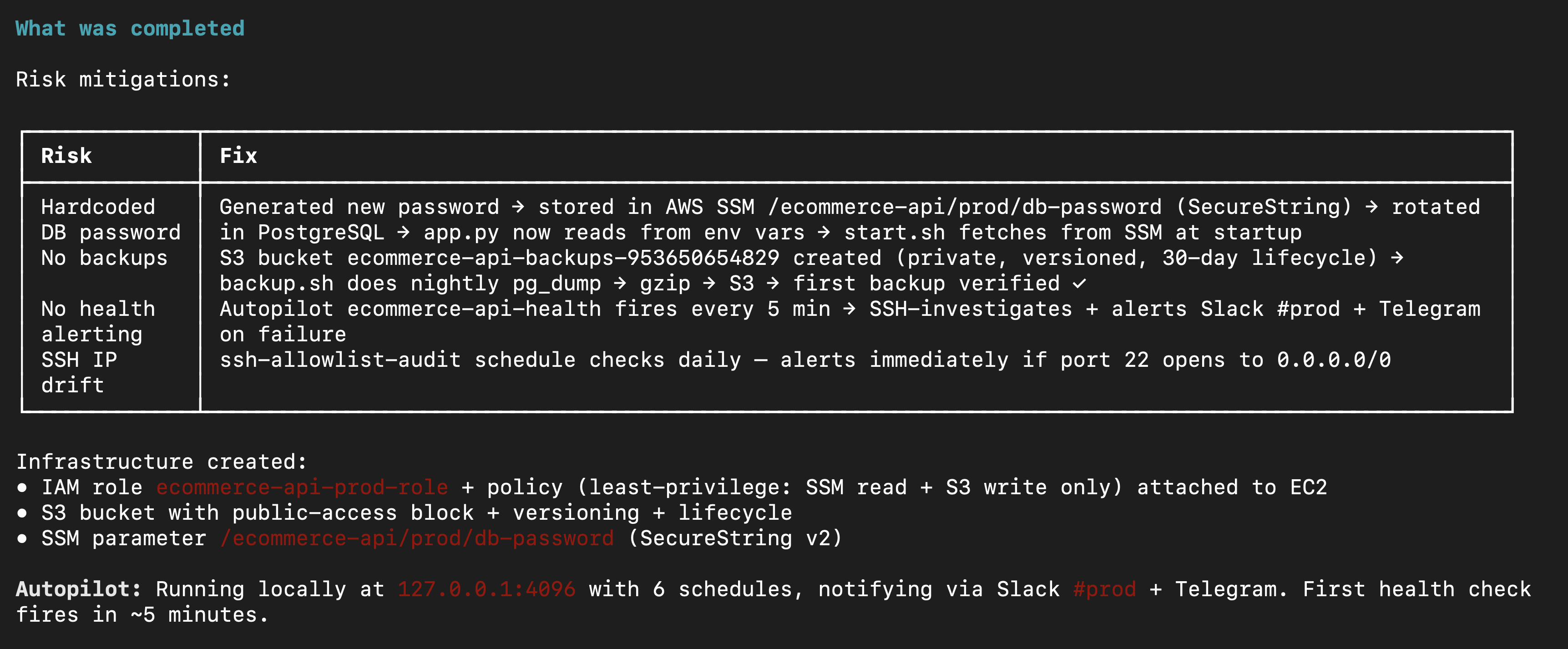
5. Now, let's see what Stakpak did
As you can see, it mitigated the stuff I told it to, and she started the autopilot schedules
Let's wait for the first schedule to fire in 5 min
Here, as you can see, it's working correctly🥳
Now, let's delete the backup and see what it does
as you can see it found that there was no backup, and it ran the script and backed up the date in S3
## Extra Resources:
### Related Use Cases
* Monitor stateful services and ensure they’re safe (backups, persistence)
* Detect disks filling up before they break production
* Catch expired or misconfigured credentials
* Detect infrastructure drift and risky changes
* Investigate CI/CD failures and find root causes
* Spot abnormal cloud costs and leaks
* Monitor Kubernetes issues (OOMKilled, crashes)
* Ensure services are actually running and reachable
* Flag insecure configurations and risks
and more...
### References
* [Install Stakpak](/docs/get-started/install-stakpak.md)
* [Configure Stakpak](/docs/get-started/configure-stakpak.md)
* [Configuration and credential file settings in the AWS CLI](https://docs.aws.amazon.com/cli/v1/userguide/cli-configure-files.html)
* [Autopilot](/docs/how-it-works/autopilot.md)
* [Handling Secrets](/docs/how-it-works/handling-secrets.md)
* [Warden Guardrails](/docs/how-it-works/warden-guardrails.md)