> For the complete documentation index, see [llms.txt](https://stakpak.gitbook.io/docs/llms.txt). Markdown versions of documentation pages are available by appending `.md` to page URLs; this page is available as [Markdown](https://stakpak.gitbook.io/docs/tutorial/set-up-a-local-aws-environment-with-ministack.md).
# Set Up a Local AWS Environment with MiniStack
Mini Stack is a free local stack alternative
## Overview
Running cloud infrastructure locally is now easier than ever with tools like MiniStack.
This shift became even more important recently, as LocalStack changed its model requiring accounts, authentication tokens, and introducing paid plans for full usage.
As a result, many developers are looking for simpler, fully local, and free alternatives.
[MiniStack](https://ministack.org/) lets you run AWS like services locally using real containers (Postgres, Redis, S3), making development faster, cheaper, and fully offline.
In this guide, we will use MiniStack to spin up a local AWS like environment and then use Stakpak to interact with it, configure it, and operate it.
{% hint style="warning" %}
**LocalStack moved core services behind a paid plan.** If you relied on LocalStack Community for local dev and CI/CD, [MiniStack](https://ministack.org/) is your free, MIT-licensed drop-in replacement. No sign up, no API key, no telemetry.
{% endhint %}
## Problem
Setting up and working with local cloud environments manually can still be painful:
* You need to configure services (databases, storage, networking)
* You have to remember CLI commands or SDK usage
* You need to debug issues across multiple containers
* You manually test if services are actually working
* You document setup steps for future use
Even with tools like MiniStack replacing LocalStack for many use cases, **operating local infrastructure is still manual work**.
Small mistakes like misconfigured services, missing environment variables, or broken connections can slow down development.
## How Stakpak Helps
Stakpak acts as an operator for your local infrastructure.
Instead of manually configuring and debugging everything, you can just tell Stakpak what you want, and it will:
* Understand your local MiniStack environment
* Detect running services (Postgres, Redis, S3, etc.)
* Configure and connect services together
* Run commands and fix issues automatically
* Validate that everything is working correctly
* Document what it did
Optionally, you can enable continuous checks later (with [Autopilot](/docs/how-it-works/autopilot.md)), but for this guide we focus on setup and operations.
## Step-by-Step Guide
### Prerequisites
1. [Install Stakpak](/docs/get-started/install-stakpak.md)
2. [MiniStack installed](https://ministack.org/) (or you can ask Stakpak to install it)
3. [Docker Installed](https://www.docker.com/get-started/) (or you can ask Stakpak to install it)
### Architecture
### Application
#### What the app does
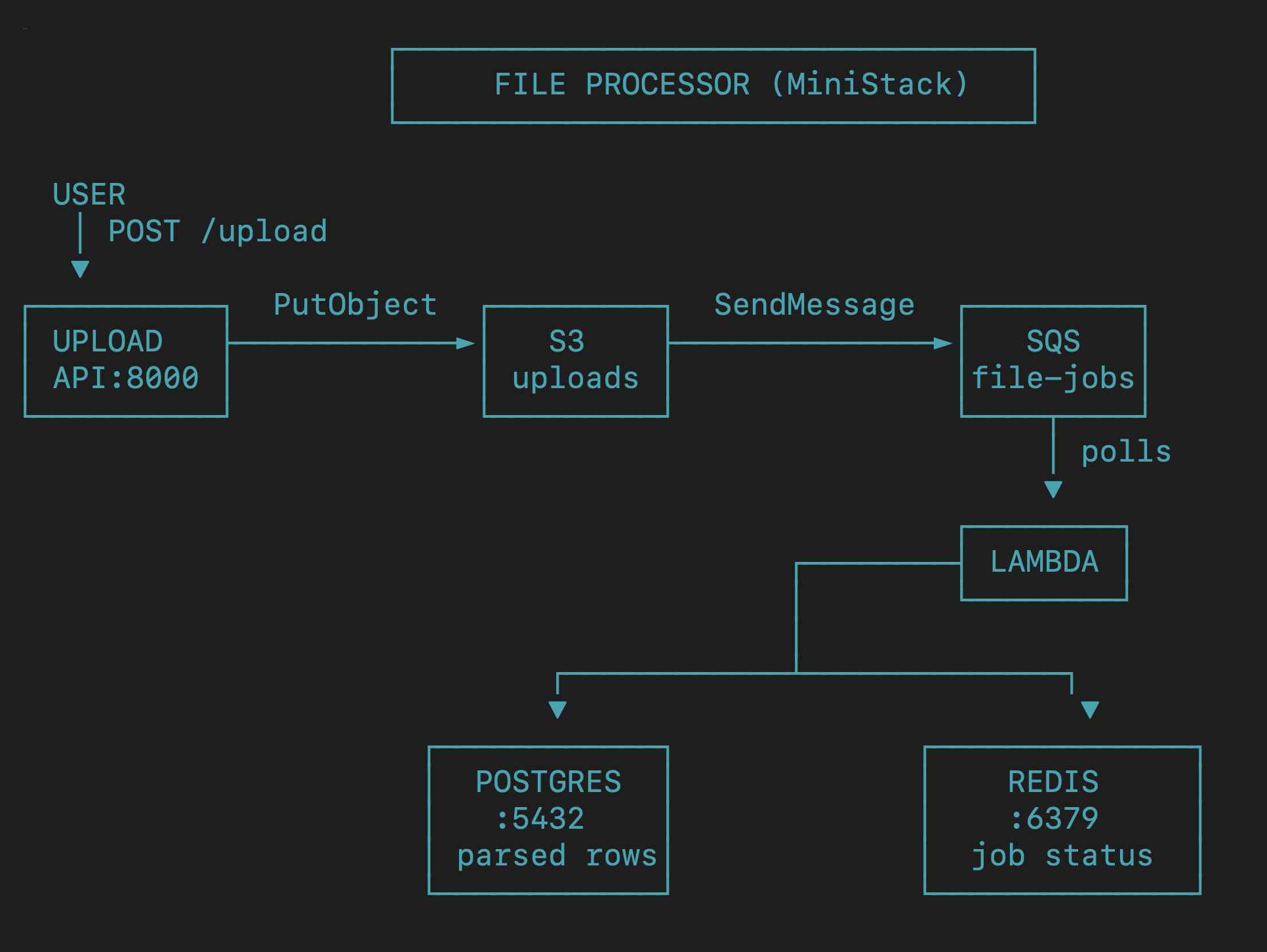
A user uploads a CSV or JSON file.
* It lands in S3.
* An event sends a job to SQS.
* A Lambda reads the message.
* The Lambda parses the file and stores results in Postgres.
* It writes job state to Redis.
You can check the code source [here](https://github.com/noureldin-azzab/aws-local-file-processor)
Now we can start that we understand the app and the architecture, we can start deploying it
### Deployment
1. Open Stakpak and ask it to deploy your app locally. That's it!
2. It read the codebase and understood the architecture
3. Spun up MiniStack, Postgres, and Redis via Docker Compose
4. Bootstrapped AWS resources: S3 bucket, SQS queue, and Lambda
5. Connected SQS to Lambda so uploads trigger processing automatically
Not lets test it..
### Testing
It's working 🥳
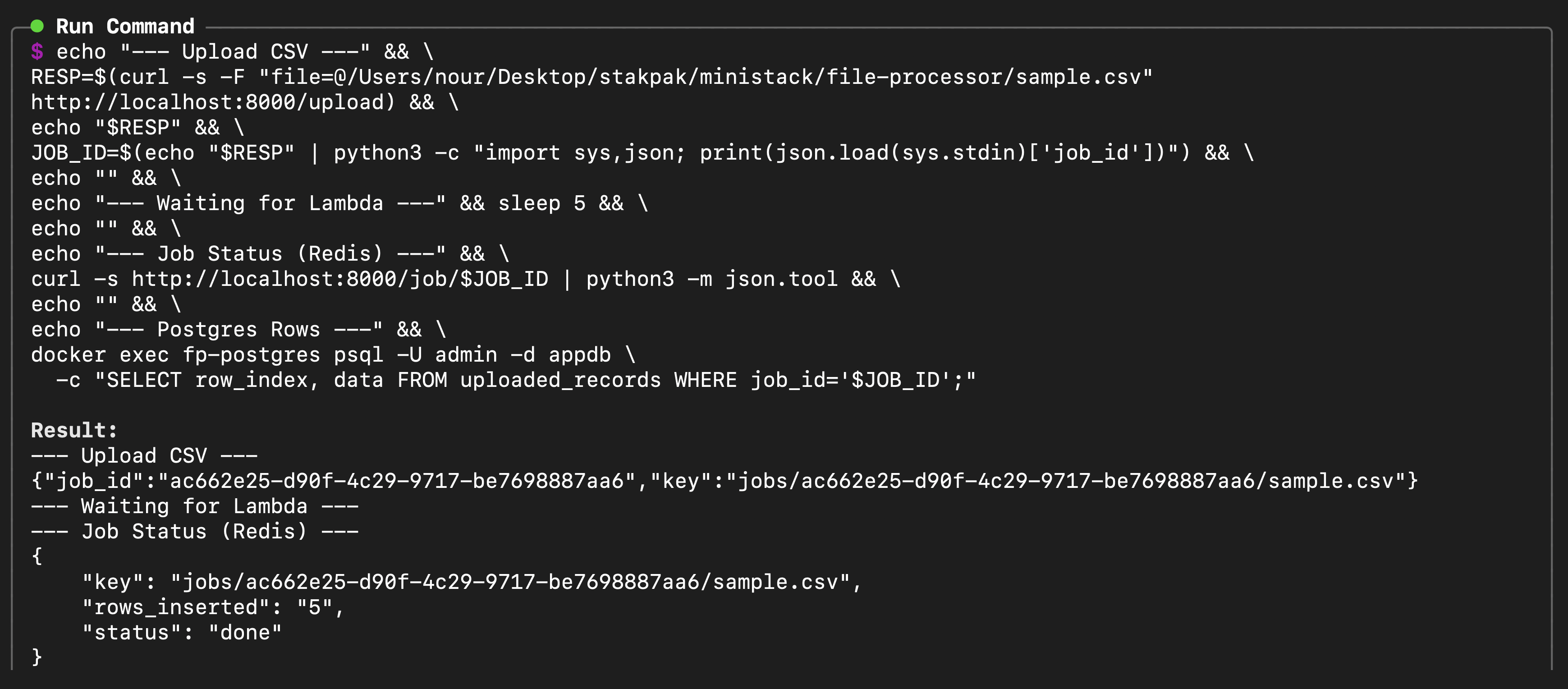
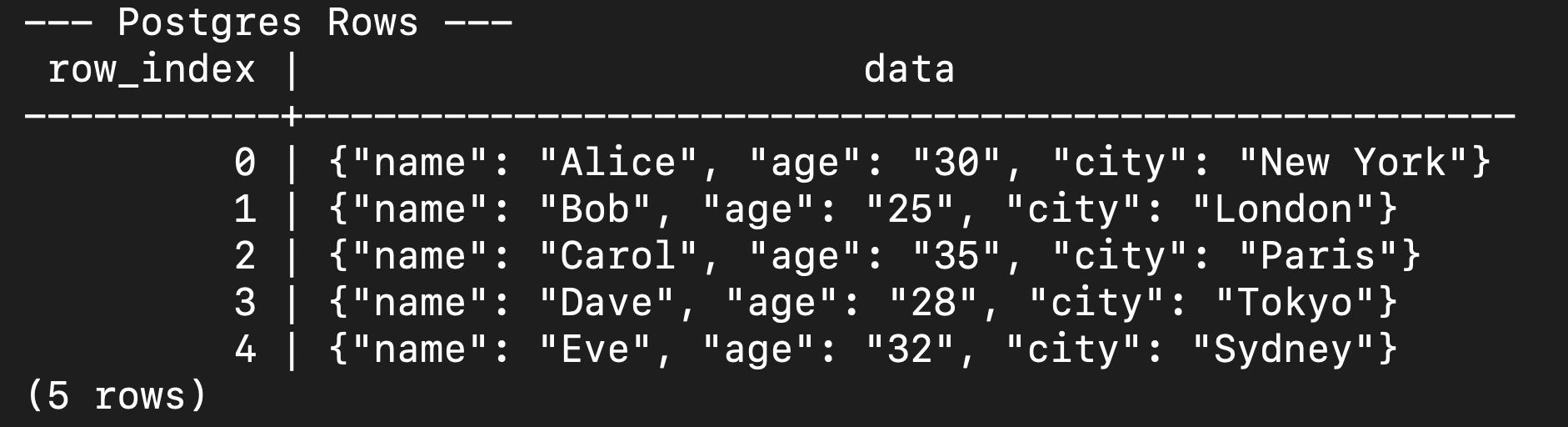
Here is what happened:
* We uploaded sample.csv -> got back a job\_id
* Lambda fired within 5 seconds (SQS polling)
* Redis shows status: done, rows\_inserted: 5
* Postgres has all 5 rows parsed and stored
## Extra Resources:
### Related Use Cases
* [Detect and Fix Missing Backups for a PostgreSQL DB in Production](/docs/tutorial/detect-and-fix-missing-backups-for-a-postgresql-db-in-production.md)
* [Deploy your own OpenVPN Server on AWS](/docs/tutorial/deploy-your-own-openvpn-server-on-aws.md)
* [Containerize Next.js Application](/docs/archive/containerize-next.js-application.md)
and more...
### References
* [Install Stakpak](/docs/get-started/install-stakpak.md)
* [Configure Stakpak](/docs/get-started/configure-stakpak.md)
* [MiniStack Documentation](https://ministack.org/)